Usage Example
Below is an example use case using the LandsatCollection module to create
an NDWI image collection, generate water classification maps, and calculate
a time series of surface water area.
Please see example notebooks for more details and examples, or feel free to request additional examples or assistance on GitHub.
1. Create a Filtered Landsat Image Collection
# 1. Import necessary packages and modules
import ee
from RadGEEToolbox import LandsatCollection

# 2. Authenticate & Initialize GEE API
ee.Authenticate()
ee.Initialize()

# 3. Define study area boundary - in this case Lake Powell, Utah
study_area = ee.Geometry.Polygon(
    [[[-111.35875055487008, 37.19999663127137],
      [-111.35875055487008, 37.00119876939416],
      [-111.12048456365915, 37.00119876939416],
      [-111.12048456365915, 37.19999663127137]]])

# 4. Create a Landsat image collection
collection = LandsatCollection(
    start_date='2020-01-01',
    end_date='2025-01-01',
    cloud_percentage_threshold=10,
    boundary=study_area
)

# 5. Check collection by printing image dates
dates = collection.dates
print(dates)
2. Apply a Cloud Mask and Compute NDWI
# 1. Mask clouds
cloud_masked_collection = collection.masked_clouds_collection

# 2. Generate NDWI image collection
cloud_masked_NDWI_collection = cloud_masked_collection.ndwi

# 3. (Optional) Classify water using a binary NDWI threshold
water_classification_maps = cloud_masked_collection.ndwi_collection(
    threshold=0
)
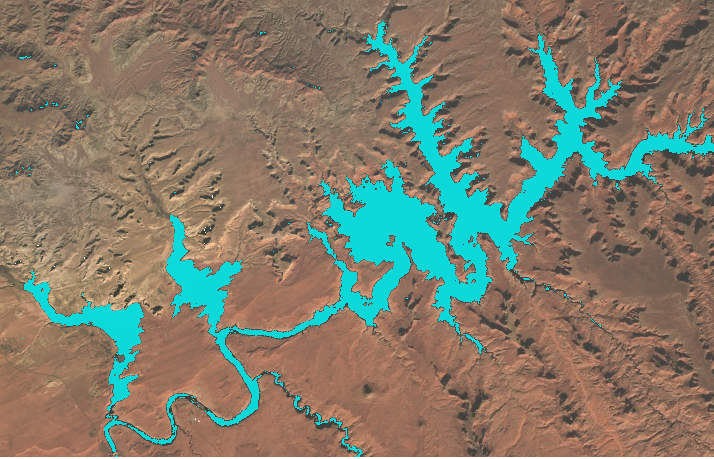
Visualization of true color and classified water (in blue) from one of the dates in the collection.
To see the code used to display this image, please view this Example Notebook
3. Calculate Water Area Time Series
calculate_water_area = cloud_masked_NDWI_collection.pixelAreaSumCollection(
    band_name='ndwi',
    geometry=study_area,
    threshold=0,
    scale=90
)

print('List of square meters of water in images:',
      calculate_water_area.ExportProperties('ndwi'))
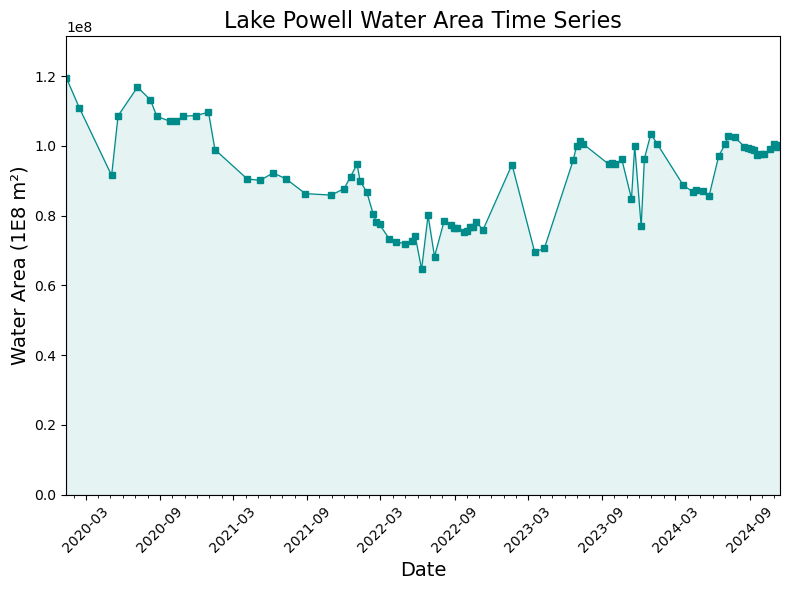
To see the code used to display this plot, please view this Example Notebook
You can also explore the Example Notebooks for more usage examples.
NOTE for those newer to Python: when you see property next to the function name in the RadGEEToolbox documentation,
you do not need to add parentheses at the end of the function when calling the function.
For example: `my_image_collection.add_date_property` calls the add_date_property property function upon the my_image_collection image collection -
no parentheses needed. All other non-property functions require one or more arguments to be specified by the user, and will require the use of parentheses
to define the function arguments.